

Yes, business automation genuinely saves you 10 or more hours every week, not by doing the hard parts of your job, but by taking over the tasks that never needed a human in the first place.
Sending follow-up emails manually. Confirming appointments one by one. Chasing leads that went quiet. Copying contact details from one tool to another. Asking happy customers to leave a review. Replying to the same five questions every day across three different platforms. Calling back missed calls when you finally have a free moment, which is often too late.
None of these tasks requires your expertise. None of them needs your creativity or judgment. They are administrative, repetitive, and predictable. Which means they are exactly the kind of work that automation handles better than any human ever could, because automation never forgets, never gets tired, and never waits until tomorrow.
This post breaks down precisely where those 10 hours go each week, which specific automations recover them, and what your business looks like when that time is given back to you.
Why Most Small Businesses Are Losing Time They Cannot See
The tricky thing about administrative time loss is that it does not feel dramatic. It is not one big problem you can point to and fix. It is twenty small tasks scattered through your day, each taking five or ten minutes, each feeling necessary, and none of them moving your business forward in any meaningful way.
A cleaning company owner spends forty minutes every morning confirming the day's bookings and sending reminders to clients. A consultant manually sends a follow-up email to every new inquiry, then another three days later if they have not heard back, and another a week after that. A fitness studio manager calls every no-show after class to rebook them. A real estate agent copies lead details from a contact form into a spreadsheet, then into a CRM, and then sends a welcome email from their inbox.
Each of these people would tell you they are just doing what needs to be done. And they are right. These tasks do need to happen. The problem is not that the work exists. The problem is that they are the ones doing it, manually, every single time, when a properly set up automation could handle all of it without their involvement.
Studies on small business productivity consistently show that business owners spend between 20 and 40 percent of their working week on tasks that could be fully automated. For a standard 50-hour week, that is 10 to 20 hours of recoverable time.
The first step is recognizing where your time actually goes. Most business owners significantly underestimate how much time repetitive tasks consume because each individual task feels small. It is only when you add them up across a full week that the picture becomes clear.
The 7 Automations That Save the Most Time
1. Automated Lead Follow-Up Sequences
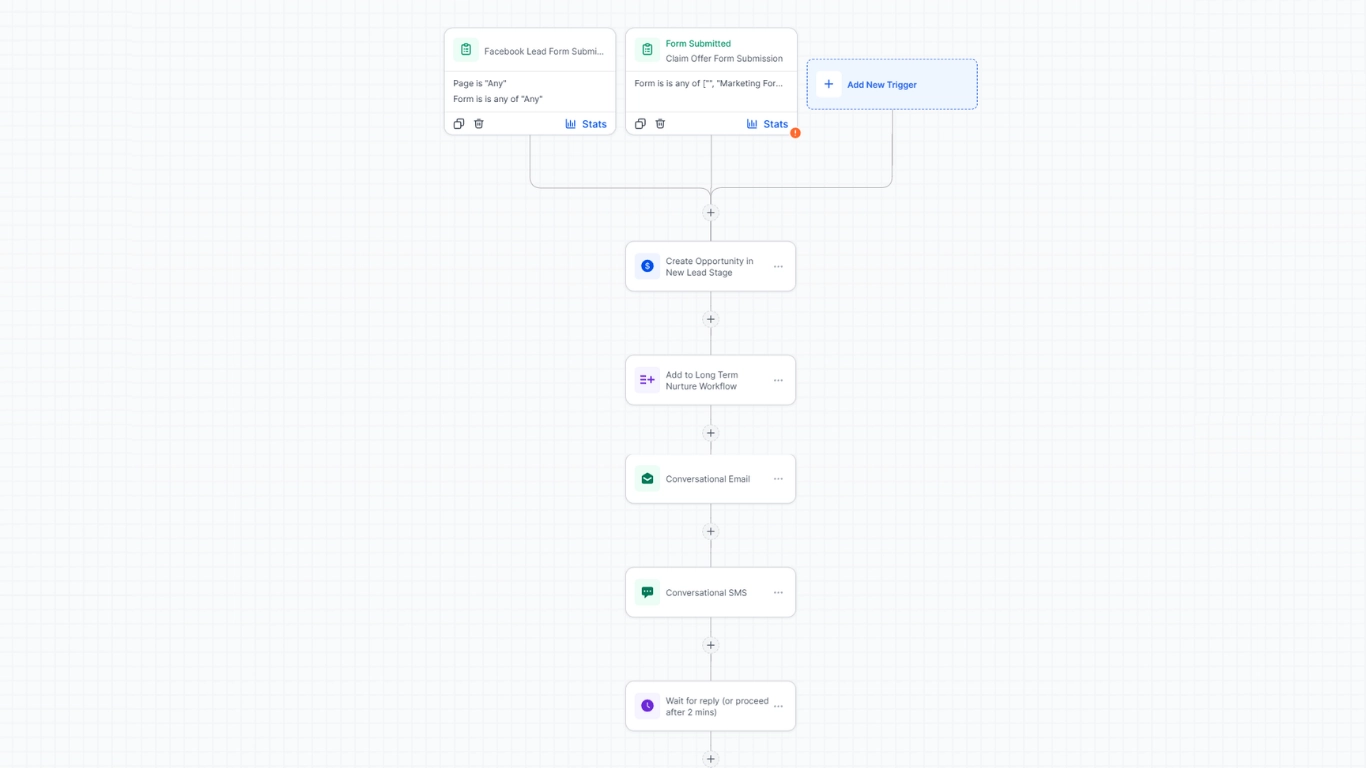
Following up with new leads is one of the highest-value activities in any business, and also one of the most commonly neglected, not because business owners do not care, but because they are busy and manual follow-up takes time they do not always have.
When someone fills out a contact form on your website, sends a message through social media, or calls your business for the first time, the clock starts. The businesses that respond within the first few minutes convert dramatically more leads than those who respond hours later. Most small businesses respond hours later, if at all.
An automated lead follow-up sequence changes this completely. The moment a new inquiry comes in, an automated message goes out instantly. It confirms you received their message, tells them what to expect next, and keeps them engaged while you are busy with other things. If they do not respond, a second message goes out after a set number of days. Then a third. Each one is personalized to feel like it was written specifically for them, because it was, just once, by you, when you set the sequence up.
• Average time saved: 3 to 5 hours per week for businesses receiving 10 or more inquiries
• Average conversion improvement: businesses with automated follow-up convert 30 to 50 percent more leads than those relying on manual outreach
• Works for: consultants, service businesses, agencies, clinics, fitness studios, real estate, and any business that relies on inbound inquiries
2. Appointment Reminders and Confirmations
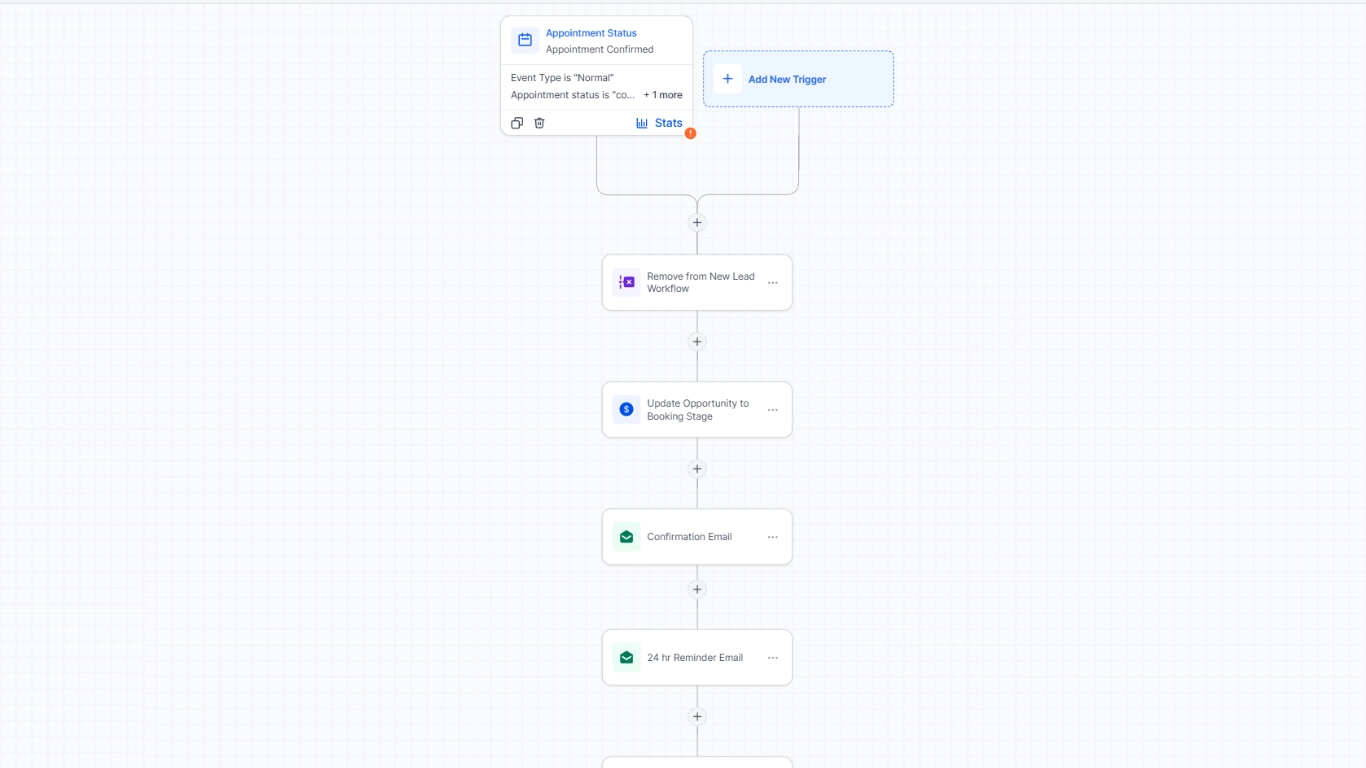
No-shows are expensive. A missed appointment is not just lost revenue for that slot, it is a time slot you could have filled with someone else, plus the time you spent preparing, plus the follow-up required afterward.
Automated appointment reminders eliminate the majority of no-shows without you doing anything manually. When a booking is made, a confirmation goes out immediately. Twenty-four hours before the appointment, a reminder goes out. A few hours before, another one. Each message can include the appointment details, a link to reschedule if needed, and any preparation instructions the client should know.
For a physiotherapy clinic seeing twenty patients a week, reducing no-shows from three per week to one per week saves the equivalent of two full appointment slots in revenue, every single week, with no additional effort.
• Average time saved: 1 to 2 hours per week on manual confirmation calls and messages
• Average no-show reduction: 25 to 40 percent with automated reminder sequences
• Works for: any appointment-based business, including healthcare, beauty, fitness, consulting, legal, and home services
3. Missed Call Text Back
This one is simple, but the impact is disproportionate to how straightforward it is.
Every missed call is a potential customer who tried to reach you and got nothing back. In most cases, they move on to the next option within minutes. A missed call text back automation sends an immediate SMS the moment a call goes unanswered. The message lets the caller know you are currently unavailable, gives them a way to respond, and keeps the conversation alive until you can follow up properly.
A plumbing company that averages eight missed calls per day, and converts even two of them into jobs as a result of an immediate text back, is generating significant additional revenue from leads that previously disappeared entirely. The automation costs nothing extra to run once it is set up, and it works every day without supervision.
• Average time saved: 1 hour per week on return call attempts that go unanswered
• Works for: any business that receives inbound calls, particularly local service businesses, trades, healthcare, and hospitality
4. Automated Review Requests
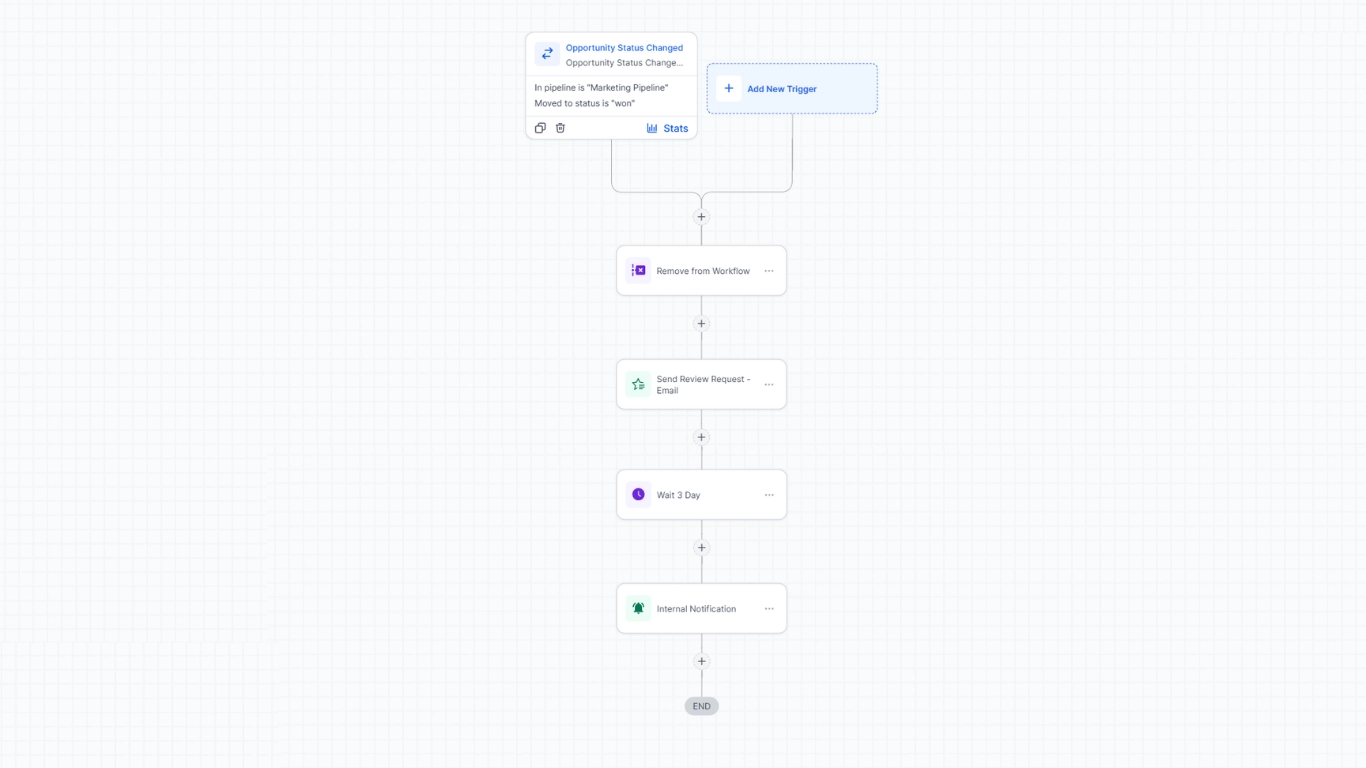
Reviews are one of the most powerful trust signals your business has, and most businesses collect far fewer than they should, not because their customers are unhappy, but because asking for reviews feels awkward and is easy to forget.
An automated review request sends a polite message to every customer after a completed service or purchase. The message thanks them for their business and includes a direct link to leave a review. It goes out automatically, at the right moment, every single time, without you having to remember or feel awkward about asking.
A restaurant that serves two hundred covers a week and sends an automated review request to each table would, with even a five percent conversion rate, collect ten new reviews every week. Over a year, that is over five hundred reviews, building trust and improving visibility without a single manual action.
• Average time saved: 1 to 2 hours per week on manual review outreach
• Average review volume increase: businesses using automated review requests collect 3 to 5 times more reviews than those asking manually
• Works for: virtually every consumer-facing business
5. CRM Auto-Population and Lead Tagging
If your current process involves copying contact details from one place to another, you are spending time on a task that should not exist.
When your website form, your chatbot, your social media messages, and your phone inquiries are all connected to a central CRM, contact records are created automatically. The lead's name, contact details, what they asked about, where they came from, and when they reached out are all captured without anyone typing a single thing. Tags are applied automatically based on the inquiry type, so your pipeline organizes itself as leads come in.
A marketing agency receiving thirty inquiries a week through various channels and manually logging each one into a CRM spends approximately two hours per week on data entry alone. With automation, those two hours disappear entirely, and the data is actually more accurate because there is no human error in the transfer.
• Average time saved: 1 to 3 hours per week, depending on inquiry volume
• Works for: any business managing leads from multiple channels simultaneously
6. Re-Engagement Flows for Cold Leads
Most businesses have a graveyard of leads who showed interest, received one or two messages, and then went quiet. Manually working through that list to follow up with each person is time-consuming and emotionally draining, and most business owners simply do not do it consistently.
A re-engagement automation sends a targeted sequence to leads who have not responded after a set period of time. The messages acknowledge the gap, remind them of what your business offers, and give them an easy way to reconnect. Some of those leads are gone for good. But a meaningful percentage of them simply got busy, and a well-timed message is all they needed to come back.
A home renovation company with forty dormant leads in their CRM that sets up a re-engagement sequence will typically recover three to eight of those leads into active conversations without making a single phone call manually.
• Average time saved: 1 to 2 hours per week on manual re-engagement attempts
• Average lead recovery rate: 8 to 15 percent of cold leads re-engage with a properly timed automated sequence
7. Post-Service Follow-Up and Upsell Sequences
The moment after a customer receives your service is one of the highest-value moments in the entire customer relationship, and most businesses let it pass without any follow-up at all.
An automated post-service sequence sends a thank-you message after every completed job or appointment. It checks in to make sure the customer is satisfied. It asks for a review. And for businesses with recurring services or complementary offerings, it introduces the next relevant service at the right moment.
A cleaning company whose clients book monthly can send an automated sequence two weeks after each clean that gently reminds the client their next booking is coming up and includes a one-click rebooking link. The automation handles customer retention that would otherwise require manual check-in calls every single month.
• Average time saved: 1 to 2 hours per week on manual client check-ins and follow-up
• Average rebooking improvement: businesses with automated post-service sequences see 20 to 35 percent higher client retention rates
Where the 10 Hours Actually Come From
Let us put some real numbers to this for a typical small service business receiving around fifteen to twenty inquiries per week.
• Automated lead follow-up sequences: 3 to 5 hours saved
• Appointment reminders and confirmations: 1 to 2 hours saved
• Missed call text back: 1 hour saved
• Automated review requests: 1 hour saved
• CRM auto-population: 1 to 2 hours saved
• Re-engagement and post-service flows: 1 to 2 hours saved
Total: 8 to 13 hours per week, recovered from tasks that required no expertise, no creativity, and no judgment. Just time.
And these are conservative estimates. Businesses with higher inquiry volumes, more complex pipelines, or multiple communication channels often report saving 15 to 20 hours per week once their automation is properly set up and running.
But the time savings are only half the story. The other half is what happens to the leads and customers who go through an automated system versus one that depends entirely on manual effort.
Leads get faster responses. Customers receive timely reminders. Reviews are collected consistently. Cold leads are re-engaged on schedule. None of this depends on whether you are having a busy day, dealing with an unexpected issue, or simply forgot. The system runs the same way every time, for every contact, regardless of what else is happening in your business.
What Automation Does Not Replace
It is worth being direct about this, because one of the most common concerns business owners raise is that automation will make their business feel impersonal or robotic.
Automation handles the repetitive, predictable parts of your communication. It does not replace the conversations that require real human judgment, empathy, and expertise. When a client has a complaint, you handle it. When a lead has a complex question that needs a real conversation, you have that conversation. When a long-term customer needs something specific, you are there.
What automation does is remove the noise so that when you do show up, you are fully present and focused on the interactions that actually matter. You are not distracted by a follow-up email you forgot to send or a review request you meant to write three days ago. The system has handled all of that. Your energy goes where it actually makes a difference.
Think of automation not as a replacement for human connection, but as the infrastructure that protects your time so you can invest it where it creates the most value.
How to Know If Your Business Is Ready for Automation
You do not need to be a large business to benefit from automation. In fact, smaller businesses often see the biggest relative impact because every hour saved represents a larger proportion of their total capacity.
If any of the following sound familiar, your business is ready:
• You are sending the same messages repeatedly to different people
• You know you should follow up with leads more consistently, but you do not always get around to it
• You have missed calls that never got returned in time
• Your review volume is growing slowly despite having happy customers
• You are manually copying contact details between tools
• You have a list of old leads you keep meaning to re-engage
• You feel like your business depends entirely on you being available
The last point is worth sitting with. A business that only functions when its owner is actively managing it is fragile. Automation is one of the most effective ways to build resilience into your operations, so that the business continues to perform whether you are in back-to-back meetings, on holiday, or simply having a day when you need to focus elsewhere.
Getting Started: The Practical Steps
The most common mistake businesses make when approaching automation is trying to automate everything at once. That leads to a complex, half-finished system that does not work properly and gets abandoned.
A better approach is to start with the single automation that would have the highest immediate impact on your business, get it running properly, and then build from there.
Step 1: Identify your biggest time drain
Think about the tasks you do most frequently that follow a predictable pattern. For most service businesses, this is either lead follow-up or appointment management. Start there.
Step 2: Map the sequence before you build it
Before setting anything up technically, write out the exact flow you want to automate. What triggers the sequence? What happens first? What happens if the person responds? What happens if they do not? Having this written down makes the technical setup significantly faster and reduces the chance of building something that does not match how your business actually works.
Step 3: Set it up, test it thoroughly, then leave it alone
The most effective automations are the ones that run in the background without constant adjustment. Once a sequence is working, resist the urge to keep tweaking it. Let it run for four to six weeks before evaluating its performance and making changes.
Step 4: Add one automation at a time
Once the first sequence is running well, add the next one. Then the next. Within two to three months, you can have a fully automated follow-up, reminder, review, and re-engagement system in place that covers the majority of your repetitive communication without any ongoing manual effort.
The businesses that benefit most from automation are not the ones that build the most complex system. They are the ones that start simple, get it working, and stay consistent.
How Engridded Helps You Automate the Right Way
At Engridded Agency, automation is not an add-on. It is a core part of every system we build for our clients.
When we set up your website and connected business tools, we also map out and build the automations that make the most sense for your specific business. Lead follow-up sequences, appointment reminders, review requests, missed call text backs, re-engagement flows, and post-service follow-ups are all set up, tested, and running before we hand anything over to you.
You do not need to figure out the logic, write the messages, or configure the technical connections. We do that work so that by the time you are live, your business is already operating with the kind of automated infrastructure that most businesses spend months trying to build on their own.
If you are ready to stop spending your week on tasks that a well-built system could handle for you, we would love to show you what that looks like for your business specifically.
Book a free call with Engridded Agency
FAQ